Table interactive
Quel était l’objectif ?
L’objectif du projet était de concevoir une table interactive que les professeurs pourraient utiliser chez eux. La table était fournie, ainsi qu’un grand écran non tactile. Il s’agissait de créer des interactions avec des objets connectés, tels que des capteurs RFID ou des joysticks. Nous devions développer une application avec la technologie de notre choix et l’intégrer à nos objets connectés.
Pour le sujet, nous avons choisi de concevoir une table connectée autour des jeux de casino et des quiz. Nous avions envisagé plusieurs jeux, comme la roulette, le blackjack et le poker. Après réflexion, nous avions décidé de nous concentrer sur le blackjack afin d’assurer sa finalisation au moment du rendu, plutôt que d’en commencer plusieurs sans les terminer.
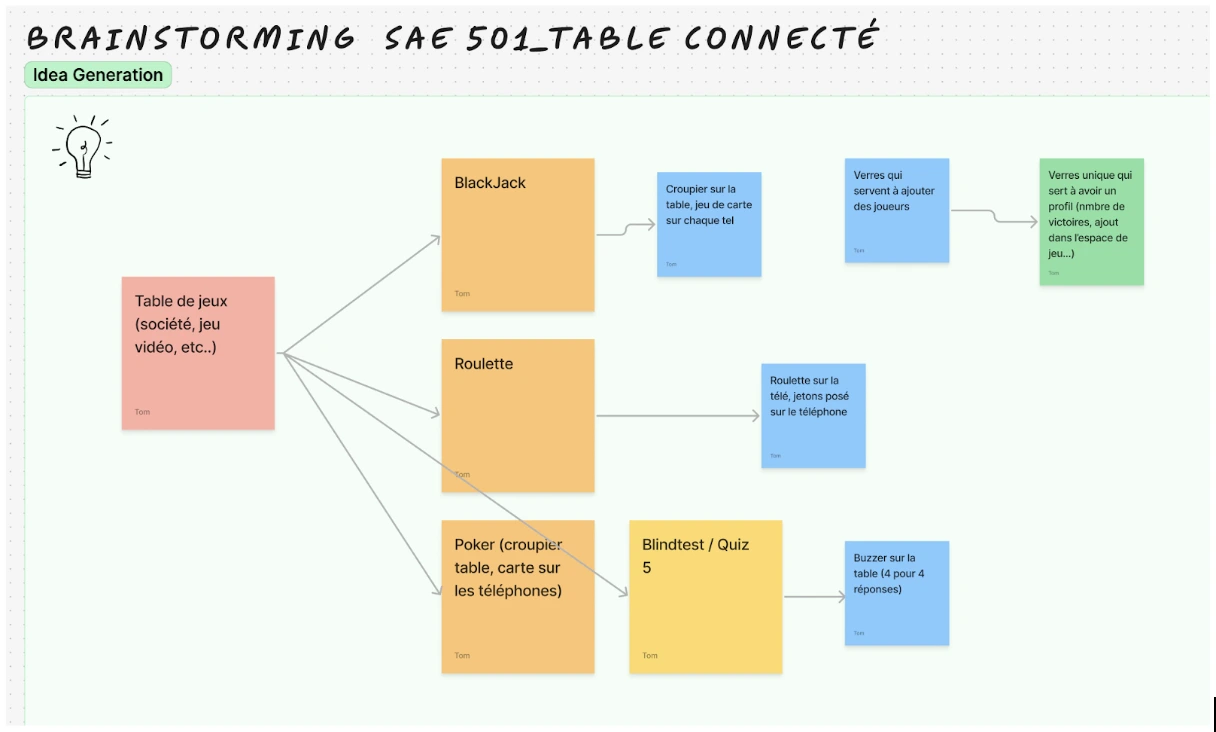 Image de la phase de brainstorming
Nous nous sommes organisé (via Trello, Discord et Drive) pour que chacuns aient des tâches équivalentes à faire. Un des problèmes rencontrés durant ce projet à été la perte de Julian qui, comme il n’avait pas d’entreprise, a du quitter la formation.
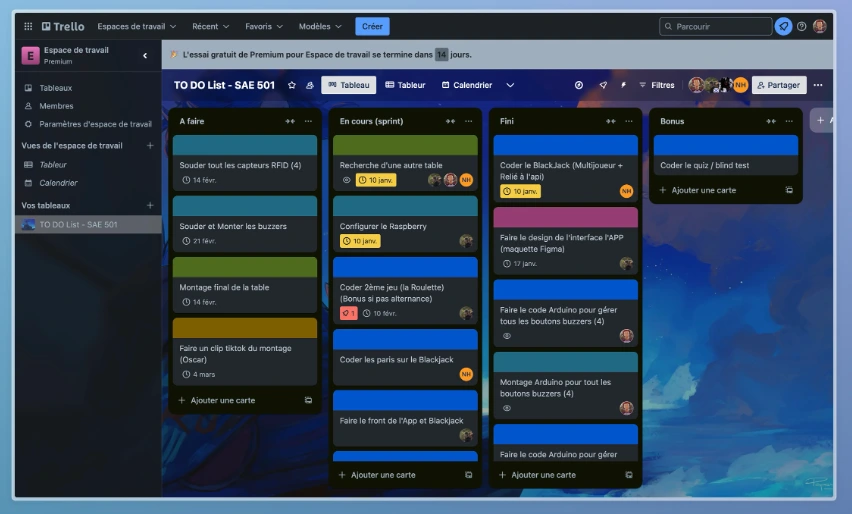 Image de notre Trello
Pour revenir à ce que j’ai fait, je vais me focaliser sur 2 tâches importantes durant cette SAE. La réception et l’envoi de données depuis le Arduino (grâce aux capteurs RFID) vers l’API et l’API en elle même.
J’ai tout d’abords réfléchi à comment rajouter des joueurs aux jeux mais de façon ludique et interactive. J’ai proposé aux autres membres du groupe l’idée d’avoir des verres avec une puce RFID qui pourrait rajouter des joueurs aux jeux. Ils étaient ok pour l’idée et j’ai donc commencé des phases de tests pour voir comment fonctionnait les capteurs RFID.
Une fois les capteurs fonctionnels, je voulais envoyer les données à mon API. Je n’avais pas envie de repasser par le LoRaWAN qui était très contraignant et qui utilisait le protocole MQTT. J’ai donc pensé à seulement faire des requêtes HTTP POST et GET sur mon API depuis l’Arduino. Il me fallait donc une carte capable de se connecter au Wifi. En demandant aux profs, j’ai pu en avoir une mais qui n’a que très peu de PIN. J’ai donc commencé des phases de tests pour voir le fonctionnement de la connexion au Wifi puis a comment elle interagissait avec les sites et serveurs web (si les requêtes POST et GET fonctionnait bien).
Quand j’avais eu la première carte sur laquelle je travaillais (celle avec le Wifi), j’ai tout de suite cherché des cartes UNO avec un dispositif Wifi. J’ai donc demandé à M.Houzet d’acheter une carte Arduino UNO R4 qui dispose du dispositif Wifi.
Une fois la carte reçue, j’ai pris le code pour les capteurs RFID et pour la connexion au Wifi et je les ais assemblé. J’ai dû faire quelques modifications car la nouvelle carte n’avait pas exactement le même fonctionnement que la précédente pour se connecter au Wifi.
J’ai fini par rajouter les boutons buzzers qui m’ont permis d’envoyer des actions que les joueurs faisaient à mon API et donc au frontend.
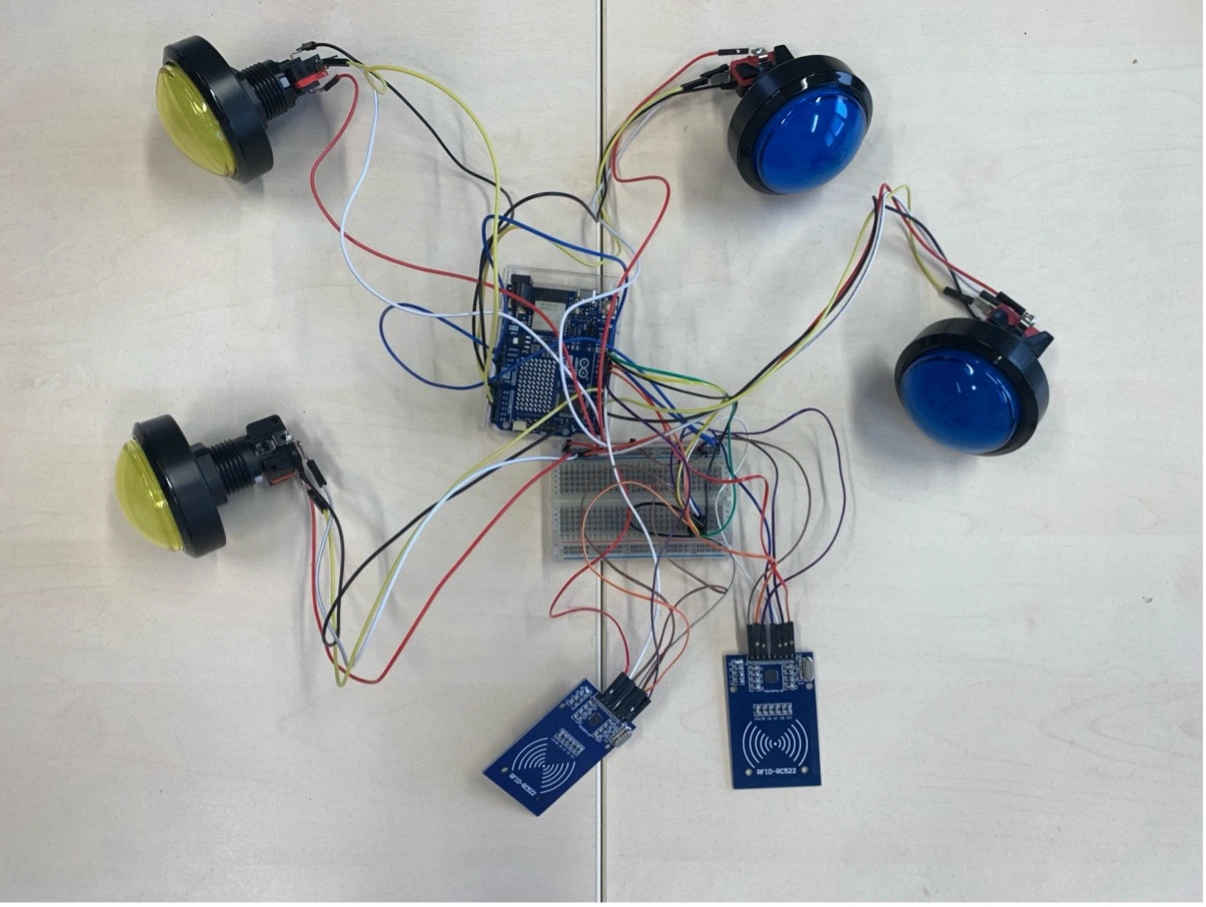 Image de mon montage Arduino
#include <SPI.h>
#include <MFRC522.h>
#include "WiFiS3.h"
#include "arduino_secrets.h"

#define RST_PIN         9
#define SS_PIN          10

#define RST_PIN2        7
#define SS_PIN2         8

const int btnYellowHit = 6;
const int ledYellowHit = 5;
const int btnBlueHit = 4;
const int ledBlueHit = 3;
const int ledYellowStand = A2;
const int btnYellowStand = A3;
const int ledBlueStand = A0;
const int btnBlueStand = A1;

MFRC522 mfrc522A(SS_PIN, RST_PIN);  // Create MFRC522 instance
MFRC522 mfrc522B(SS_PIN2, RST_PIN2);  // Create second MFRC522 instance

char ssid[] = SECRET_SSID;        // your network SSID (name)
char pass[] = SECRET_PASS;    // your network password (use for WPA, or use as key for WEP)
int status = WL_IDLE_STATUS;     // the Wifi radio's status

WiFiClient client; // Use WiFiSSLClient for HTTPS

static byte lastUid[10]; // Array to store the last UID
static byte lastUidSize = 0; // Variable to store the size of the last UID

static byte lastUid2[10]; // Array to store the last UID
static byte lastUidSize2 = 0; // Variable to store the size of the last UID

bool btnPressedHit1 = false;
bool btnPressedStand1 = false;
bool btnPressedHit2 = false;
bool btnPressedStand2 = false;

char HOST_NAME[] = "www.api-table.jocelynmarcilloux.com";
String PATH_NAME = "/api/data";
int HTTP_PORT = 80;
String HTTP_METHOD = "POST";

String uuid1;// read from sensor
String uuid2;// read from sensor

String jsonData = "{\"uuid\": \"2D2D2D2D\", \"team\": \"yellow\", \"stand\": \"0\", \"hit\": \"0\"}";
String jsonData2 = "{\"uuid\": \"2F2F2F2F\", \"team\": \"blue\", \"stand\": \"0\", \"hit\": \"0\"}";

void setup() {
  pinMode(btnYellowHit, INPUT_PULLUP);
  pinMode(ledYellowHit, OUTPUT);
  pinMode(btnBlueHit, INPUT_PULLUP);
  pinMode(ledBlueHit, OUTPUT);
  pinMode(btnYellowStand, INPUT_PULLUP);
  pinMode(ledYellowStand, OUTPUT);
  pinMode(btnBlueStand, INPUT_PULLUP);
  pinMode(ledBlueStand, OUTPUT);

  Serial.begin(9600);
  while (!Serial); // Do nothing if no serial port is opened

  SPI.begin();      // Init SPI bus

  mfrc522A.PCD_Init();    // Init MFRC522
  mfrc522B.PCD_Init(); // Init second MFRC522

  // Check for the WiFi module:
  if (WiFi.status() == WL_NO_MODULE) {
    Serial.println("Communication with WiFi module failed!");
    // don't continue
    while (true);
  }

  String fv = WiFi.firmwareVersion();
  if (fv < WIFI_FIRMWARE_LATEST_VERSION) {
    Serial.println("Please upgrade the firmware");
  }

  // Attempt to connect to Wi-Fi network
  while (status != WL_CONNECTED) {
    Serial.print("Attempting to connect to network: ");
    Serial.println(ssid);
    status = WiFi.begin(ssid, pass);
    delay(8000); // wait 8 seconds for connection
  }
  Serial.print("Connected to ");
  Serial.println(ssid);

  Serial.println("\nStarting connection to server...");
  // Attempt to connect to the server
  while (!client.connect(HOST_NAME, HTTP_PORT)) {
    Serial.println("Attempting to connect to server...");
    delay(5000); // wait 5 seconds before retrying
  }

  Serial.println("Connected to server");
}

bool isSameUid(byte *uid, byte uidSize) {
  if (uidSize != lastUidSize) {
    return false;
  }
  for (byte i = 0; i < uidSize; i++) {
    if (uid[i] != lastUid[i]) {
      return false;
    }
  }
  return true;
}

bool isSameUid2(byte *uid, byte uidSize) {
  if (uidSize != lastUidSize2) {
    return false;
  }
  for (byte i = 0; i < uidSize; i++) {
    if (uid[i] != lastUid2[i]) {
      return false;
    }
  }
  return true;
}

void updateLastUid2(byte *uid, byte uidSize) {
  lastUidSize2 = uidSize;
  for (byte i = 0; i < uidSize; i++) {
    lastUid2[i] = uid[i];
  }
}

void updateLastUid(byte *uid, byte uidSize) {
  lastUidSize = uidSize;
  for (byte i = 0; i < uidSize; i++) {
    lastUid[i] = uid[i];
  }
}

void loop() {
  // Check if the button is pressed so we can add a hit to the last scanned card
  if (digitalRead(btnYellowHit) == LOW && !btnPressedHit1) {
    // Get the jsonData in API an put it in the jsonData variable
    getJsonData(uuid1, jsonData);
    if (uuid1 != "") {
      // Extract the current hit value from jsonData
      int hitIndex = jsonData.indexOf("\"hit\":\"") + 7;
      int hitEndIndex = jsonData.indexOf("\"", hitIndex);
      int currentHit = jsonData.substring(hitIndex, hitEndIndex).toInt();
      currentHit += 1; // Increment the hit value

      // Update the jsonData with the new hit value
      jsonData = jsonData.substring(0, hitIndex) + String(currentHit) + json-Data.substring(hitEndIndex);
      sendJsonData(jsonData);
      digitalWrite(ledYellowHit, HIGH);
    }
    btnPressedHit1 = true;
  } else if (digitalRead(btnYellowHit) == HIGH) {
    digitalWrite(ledYellowHit, LOW);
    btnPressedHit1 = false;
  }

  // Check if the button 2 is pressed so we can add a hit to the last scanned card
  if (digitalRead(btnBlueHit) == LOW && !btnPressedHit2) {
    // Get the jsonData in API an put it in the jsonData variable
    getJsonData(uuid2, jsonData2);
    if (uuid2 != "") {
      // Extract the current hit value from jsonData
      int hitIndex = jsonData2.indexOf("\"hit\":\"") + 7;
      int hitEndIndex = jsonData2.indexOf("\"", hitIndex);
      int currentHit = jsonData2.substring(hitIndex, hitEndIndex).toInt();
      currentHit += 1; // Increment the hit value

      // Update the jsonData with the new hit value
      jsonData2 = jsonData2.substring(0, hitIndex) + String(currentHit) + json-Data2.substring(hitEndIndex);
      sendJsonData(jsonData2);
      digitalWrite(ledBlueHit, HIGH);
    }
    btnPressedHit2 = true;
  } else if (digitalRead(btnBlueHit) == HIGH) {
    digitalWrite(ledBlueHit, LOW);
    btnPressedHit2 = false;
  }

  // Check if the button 3 is pressed so we can set the stand to 1 for the first scanned card
  if (digitalRead(btnYellowStand) == LOW && !btnPressedStand1) {
    // Get the jsonData in API an put it in the jsonData variable
    getJsonData(uuid1, jsonData);
    if (uuid1 != "") {
      // Update the jsonData with the new stand value
      int standIndex = jsonData.indexOf("\"stand\":\"") + 9;
      int standEndIndex = jsonData.indexOf("\"", standIndex);
      int currentStand = jsonData.substring(standIndex, standEndIndex).toInt();
      currentStand = 1; // Set the stand value to 1

      // Update the jsonData with the new stand value
      jsonData = jsonData.substring(0, standIndex) + String(currentStand) + json-Data.substring(standEndIndex);
      sendJsonData(jsonData);
      digitalWrite(ledYellowStand, HIGH);
    }
    btnPressedStand1 = true;
  } else if (digitalRead(btnYellowStand) == HIGH) {
    digitalWrite(ledYellowStand, LOW);
    btnPressedStand1 = false;
  }

  // Check if the button 4 is pressed so we can set the stand to 1 for the second scanned card
  if (digitalRead(btnBlueStand) == LOW && !btnPressedStand2) {
    // Get the jsonData in API an put it in the jsonData variable
    getJsonData(uuid2, jsonData2);
    if (uuid2 != "") {
      // Update the jsonData with the new stand value
      int standIndex = jsonData2.indexOf("\"stand\":\"") + 9;
      int standEndIndex = jsonData2.indexOf("\"", standIndex);
      int currentStand = jsonData2.substring(standIndex, standEndIndex).toInt();
      currentStand = 1; // Set the stand value to 1

      // Update the jsonData with the new stand value
      jsonData2 = jsonData2.substring(0, standIndex) + String(currentStand) + json-Data2.substring(standEndIndex);
      sendJsonData(jsonData2);
      digitalWrite(ledBlueStand, HIGH);
    }
    btnPressedStand2 = true;
  } else if (digitalRead(btnBlueStand) == HIGH) {
    digitalWrite(ledBlueStand, LOW);
    btnPressedStand2 = false;
  }

  // Check if button 1 and 3 are pressed at the same time for 3 sec to delete the first scanned card
  if (digitalRead(btnYellowHit) == LOW && digitalRead(btnYellowStand) == LOW) {
    unsigned long startTime = millis();
    while (digitalRead(btnYellowHit) == LOW && digitalRead(btnYellowStand) == LOW) {
      if (millis() - startTime >= 3000) {
        deleteJsonData(uuid1);
        break;
      }
    }
  }

  // Check if button 2 and 4 are pressed at the same time for 3 sec to delete the second scanned card
  if (digitalRead(btnBlueHit) == LOW && digitalRead(btnBlueStand) == LOW) {
    unsigned long startTime = millis();
    while (digitalRead(btnBlueHit) == LOW && digitalRead(btnBlueStand) == LOW) {
      if (millis() - startTime >= 3000) {
        deleteJsonData(uuid2);
        break;
      }
    }
  }

  // Lecture des cartes
  // Premier lecteur
  if (mfrc522A.PICC_IsNewCardPresent() && mfrc522A.PICC_ReadCardSerial()) {
    if (!isSameUid(mfrc522A.uid.uidByte, mfrc522A.uid.size)) {
      Serial.println();
      Serial.print("UID1: ");
      uuid1 = "";
      for (byte i = 0; i < mfrc522A.uid.size; i++) {
        Serial.print(mfrc522A.uid.uidByte[i] < 0x10 ? " 0" : " ");
        Serial.print(mfrc522A.uid.uidByte[i], HEX);
        uuid1 += String(mfrc522A.uid.uidByte[i] < 0x10 ? " 0" : " ") + String(mfrc522A.uid.uidByte[i], HEX);
      }
      uuid1.trim();
      uuid1.replace(" ", "");
      updateLastUid(mfrc522A.uid.uidByte, mfrc522A.uid.size);
      jsonData = "{\"uuid\": \"" + String(uuid1) + "\", \"team\": \"yellow\", \"stand\": \"0\", \"hit\": \"0\"}";
      sendJsonData(jsonData);
    }
    mfrc522A.PICC_HaltA();
  }

  // Deuxième lecteur
  if (mfrc522B.PICC_IsNewCardPresent() && mfrc522B.PICC_ReadCardSerial()) {
    if (!isSameUid2(mfrc522B.uid.uidByte, mfrc522B.uid.size)) {
      Serial.println();
      Serial.print("UID2: ");
      uuid2 = "";
      for (byte i = 0; i < mfrc522B.uid.size; i++) {
        Serial.print(mfrc522B.uid.uidByte[i] < 0x10 ? " 0" : " ");
        Serial.print(mfrc522B.uid.uidByte[i], HEX);
        uuid2 += String(mfrc522B.uid.uidByte[i] < 0x10 ? " 0" : " ") + String(mfrc522B.uid.uidByte[i], HEX);
      }
      uuid2.trim();
      uuid2.replace(" ", "");
      updateLastUid2(mfrc522B.uid.uidByte, mfrc522B.uid.size);
      jsonData2 = "{\"uuid\": \"" + String(uuid2) + "\", \"team\": \"blue\", \"stand\": \"0\", \"hit\": \"0\"}";
      sendJsonData(jsonData2);
    }
    mfrc522B.PICC_HaltA();
  }
}

void getJsonData(String &uuidGet, String &jsonDataGet) {
  Serial.println();
  Serial.println("Getting data...");
  Serial.println("UUID: " + uuidGet);
  Serial.println("JSON data: " + jsonDataGet);
  Serial.println();
  if (client.connect(HOST_NAME, HTTP_PORT)) {
    client.println("GET " + PATH_NAME + "/" + uuidGet + " HTTP/1.1");
    client.println("Host: " + String(HOST_NAME));
    client.println("Connection: close");
    client.println();

    while (client.connected()) {
      if (client.available()) {
        String line = client.readStringUntil('\n');
        if (line.startsWith("{")) {
          jsonDataGet = line;
          break;
        }
      }
    }
    client.stop();
  } else {
    Serial.println("Connection to server failed");
  }
}

void sendJsonData(String data) {
  if (client.connect(HOST_NAME, HTTP_PORT)) {
    Serial.println();
    // send HTTP header
    client.println("POST " + PATH_NAME + " HTTP/1.1");
    client.println("Host: " + String(HOST_NAME));
    client.println("Content-Type: application/json");
    client.println("Connection: close");
    client.print("Content-Length: ");
    client.println(data.length());
    client.println(); // end HTTP header

    // send HTTP body
    client.println(data);
    Serial.println(data);

    while (client.connected()) {
      if (client.available()) {
        char c = client.read();
        Serial.print(c);
      }
    }

    client.stop();
    Serial.println();
    Serial.println("Data sent and disconnected");
  } else {
    Serial.println("Connection to server failed");
  }
}

void deleteJsonData(String uuid) {
  if (client.connect(HOST_NAME, HTTP_PORT)) {
    Serial.println();
    Serial.println("Deleting data...");
    // send HTTP header
    client.println("DELETE " + PATH_NAME + "/" + uuid + " HTTP/1.1");
    client.println("Host: " + String(HOST_NAME));
    client.println("Connection: close");
    client.println(); // end HTTP header

    while (client.connected()) {
      if (client.available()) {
        char c = client.read();
        Serial.print(c);
      }
    }

    client.stop();
    Serial.println();
    Serial.println("Data deleted and disconnected");
  } else {
    Serial.println("Connection to server failed");
  }
}
Code Arduino pour les capteurs RFID et les buzzers
Pour ce qui de l’API, je l’ai pensé en fonction des besoins du blackjack. Étant donnée que seulement 2 actions sont possible (Stand et Hit) et que il faut savoir quelle personne est dans quelle équipe, je n’avais besoin de transmettre que 4 données.
- Hit
- Stand
- Team
- Uuid
J’ai beaucoup utilisé la documentation de Hono pour savoir comment bien utiliser chaque fonction. Au fil du projet, j’en ai rajouté car mes besoins ont évolué.
import { Hono } from 'hono';
import { serve } from '@hono/node-server';
import { cors } from 'hono/cors';

const datas = [
];

const app = new Hono();
app.use('/api/*', cors())

app.get('/', (c) => {
    return c.text('Hello World');
});

app.get('/api/data', (c) => {
    console.log('GET /api/data');
    return c.json(datas);
});

app.get('/api/data/:uuid', (c) => {
    console.log('GET /api/data/:uuid');
    const uuid = c.req.param('uuid');
    const data = datas.find(d => d.uuid === uuid);

    if (!data) {
        return c.status(404).json({ error: 'Data not found' });
    }

    return c.json(data);
});

app.post('/api/data', async (c) => {
    console.log('POST /api/data');
    const data = await c.req.json();

    if (!data.uuid || !data.team) {
        return c.status(400).json({ error: 'Invalid data' });
    }

    const existingData = datas.find(d => d.uuid === data.uuid);

    if (existingData) {
        if (existingData.team === data.team && existingData.hit === data.hit && existingData.stand === data.stand) {
            // Do nothing if it already exists with the same team, hit, and stand
            return c.json(datas);
        } else {
            // Update the data if any of the fields (team, hit, or stand) change
            existingData.team = data.team;
            existingData.hit = data.hit;
            existingData.stand = data.stand;
        }
    } else {
        // Add new data if the uuid does not exist
        datas.push(data);
    }

    return c.json(datas);
});

app.delete('/api/data/:uuid', (c) => {
    console.log('DELETE /api/data/:uuid');
    const uuid = c.req.param('uuid');
    const index = datas.findIndex(d => d.uuid === uuid);

    if (index === -1) {
        return c.status(404).json({ error: 'Data not found' });
    }

    datas.splice(index, 1);

    return c.json(datas);
});

serve({
    fetch: app.fetch,
    port: 8080
})
Code JS pour l’API
Récap démarche
- Prototypage des interactions
- Tests matériels
- Conception de l’API
- Établissage de la communication entre l’API et le Arduino
- Modification de l’API
Résultat
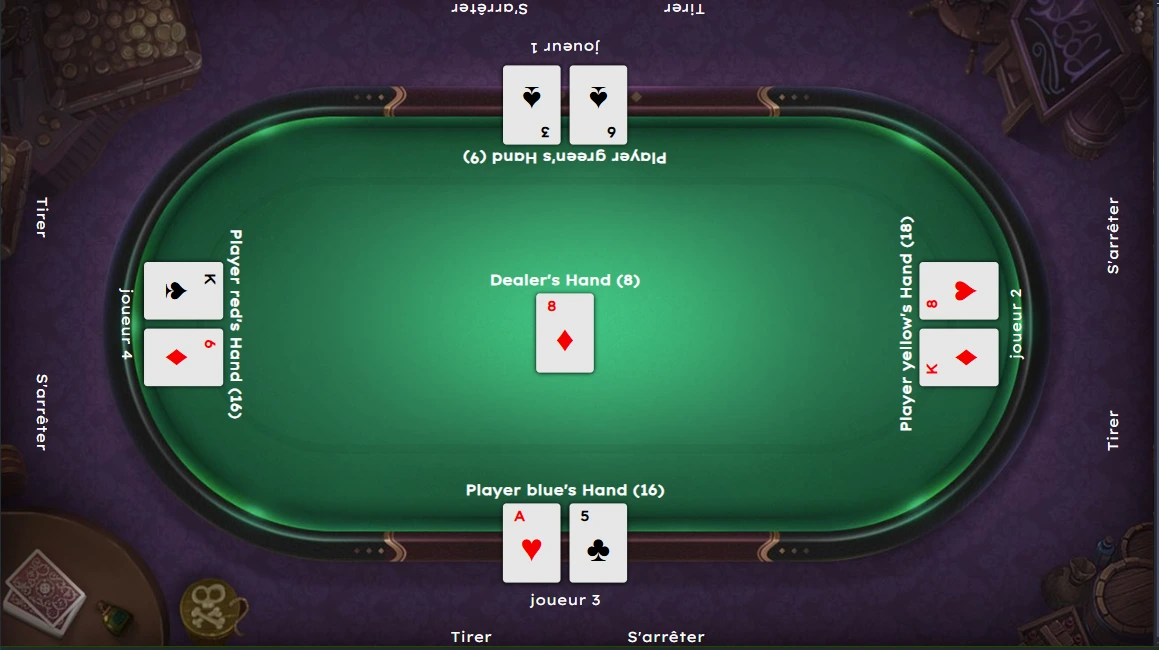
Pistes d’améliorations
- Réduire le code Arduino pour le rendre plus facile de compréhension et plus maintenable
- Étendre l’API pour supporter d’autres jeux de casino ou quiz, comme initialement envisagé
- Bien se questionner sur l’utilité du WiFi dans notre projet (nous avons finalement tout mis en local)